
I have to admit, when I first joined groups in Facebook, I had no idea what a Facebook document was, how to use it, or how to add my information to it. In fact, I still sort of dislike them (although I couldn’t tell you why) even though they are extremely useful.
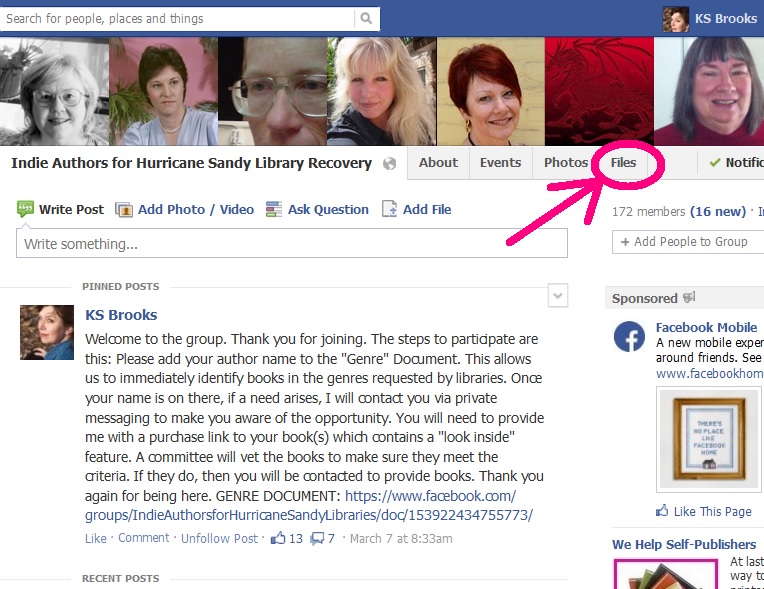 Groups use Facebook documents to share information – like the Twitter handles, web sites, blogs, genres, and other kinds of data about their members. Some writers/reviewers groups use them to list books to be read or reviewed, and available reviewers and what genres they prefer.
One thing that may be confusing to some is that Facebook changed the nomenclature from “Documents” to “Files.” If you want to find the ones in your group, scroll up to the top of the page, to the right, and click “Files.” (see above, left) Continue reading “Tutorial: Facebook Documents”
 I was speaking with a pal recently who bemoaned the fact that websites are so hard to edit. “I wish I could have the sort of editing I can do in WordPress for a normal website,” he wailed. “I know how to use WP but I don’t know any html.” Yours truly waved her geeky little magic wand and opined, “Oh but you can use WordPress for a normal website if you want.”
 Some indie authors are tech savvy and masters at formatting their completed manuscripts into the two most commonly used ebook formats, ePub and Mobi. Some hire someone to format their eBook files. However, the approach taken by many is the simple one, upload a Word document to Amazon and let KDP convert the file. If you’re only publishing through Amazon, this works great. At least until you want to send an eBook to a friend, submit your book to a reviewer who requires an eBook file for submission, or … well, you get the idea.